ARTA: AI Art & Photo Generator
- 4.2
- Rating
- 1.00M
- Installs
- Free
- Price

 Analysis by App-foxy
I tried ARTA: AI Art & Photo Generator as the sort of creative app people often pass around at home: one person wants a quick profile image, another is curious about a tattoo concept, and someone else simply wants to turn a rough idea into a cartoon-style picture. That shared-device angle is where ARTA makes the most sense. It is an AI image-making app from AIBY Inc. in the Art & Design category, and its main appeal is speed rather than the careful control of a traditional drawing program.
My first impression was that ARTA is easier to approach than a full digital art suite. You do not need to understand layers, brushes, masks, or complex export settings before seeing a result. Instead, the app is aimed at turning a prompt or image idea into something visually presentable. That makes it useful for experimenting, but it also means the quality depends heavily on how clearly you describe what you want and how willing you are to accept a few imperfect attempts.
How ARTA fits into a shared household
A realistic use case is a quiet evening when a family member needs a new avatar, another wants to preview a fantasy illustration, and a teenager is collecting ideas for a future tattoo. ARTA can give each person a starting point without requiring everyone to learn the same complicated creative software. I found that its strongest role is as an idea generator: it helps turn a vague visual thought into several directions that can later be refined elsewhere.
You May Also Like

 Blood Strike: 2.5 Anniversary
Blood Strike’s Loadouts Turn Every Drop Into a Tactical Gamble
A close look at Blood Strike’s custom loadouts: how fast access to signature weapons reshapes its battle royale rhythm, rewards preparation, and narrows the gap between fights.

 Pandora - Music & Podcasts
Pandora’s Music Is Easy to Start, but Harder to Recover
Pandora’s strength is its low-effort path from a seed to a station. Its weak spot is how much confidence it asks you to place in connection, setup, and quiet recovery.

 8 Ball Pool
 Is Built on Rivalries, Rematches, and Routine
A close look at the rivalries, rematches, shared routines, and unanswered safety questions that turn a quick pool match into a persistent mobile community.

 Samsung Music
’s Quiet Strength Is Playing What You Already Own
Its reach comes less from spectacle than from dependable access to a personal library. That simplicity is both the app’s strongest retention engine and its ceiling.

 AccuWeather: Weather Radar
AccuWeather Review: A Quick, Clear Forecast for Everyday Decisions
For everyday plans, the best forecast is the one you can understand quickly. AccuWeather makes rain timing, radar, and local conditions easy to act on, with a few trade-offs.

 Hill Climb Racing
Why Hill Climb Racing Still Turns Crashes Into One More Run
A tiny car, a bumpy hill and one more upgrade: Hill Climb Racing keeps resurfacing because its simple chaos makes every near-miss feel personal.
More From Our News Desk



That distinction matters. I would not treat the app as a replacement for a professional illustrator or a complete photo editor. It is better at producing an initial visual concept than guaranteeing a precise final result. If the goal is a polished logo with exact lettering, a faithful technical diagram, or an illustration where every hand and facial detail must be correct, I would move to a more controlled tool after using ARTA for brainstorming.
The app is free to install, which makes it easy to test before deciding whether it belongs in a household’s regular creative routine. It also includes in-app purchases ranging from $0.99 to $49.99 per item, so the word “free” should not be interpreted as meaning that every creative option is unlimited. On a shared device, I would make sure everyone understands that some actions or content may lead to a purchase screen before anyone taps through it.
One device, several creative purposes
ARTA works particularly well when the people using it have different expectations. A casual user can enjoy quick transformations, while a more visually minded person can spend time adjusting the wording of a prompt and comparing results. I like that this creates a low-pressure way to explore art together. Someone who normally says “I cannot draw” can still contribute an idea, choose a mood, and react to the generated image.
The trade-off is that shared use can blur ownership of the creative process. If several people work in the same app session, it is easy to forget which image belongs to which person or which prompt produced a favorite result. I recommend agreeing on a simple routine: decide who is using the app, save or export anything worth keeping immediately, and avoid assuming that a later user will understand the context of an unfinished idea.
That small habit is more useful than it sounds. AI image apps encourage rapid trial and error, so a screen can quickly fill with variations that look similar at first glance. Naming files outside the app or placing them in clearly separated photo albums makes later coordination much easier, especially when the device is used by both adults and children.
What to sort out before handing over the phone
Before letting another person use ARTA, I would check which account is active on the device and who is responsible for any purchase confirmation. The app itself should not be treated as a family account manager. A shared phone or tablet may already be connected to one person’s app-store billing, and that boundary is more important than the creative prompt being entered.
I would also decide whether the user is allowed to work with personal photos. Headshot and portrait generation can be tempting, but a household should agree before someone imports another person’s face or creates an image that could embarrass them. The safest workflow is to use your own image, ask permission before using somebody else’s, and avoid treating a generated portrait as an accurate representation of the person.
For a child or younger teenager, I would sit nearby during the first session. That is not because the app is difficult to operate; it is because image generation can produce surprising interpretations of ordinary words. A child may also assume that every result is suitable to share publicly. A quick conversation about prompts, privacy, and asking before posting is worthwhile.
The listed content rating is Everyone, which makes ARTA approachable for a broad audience. Still, an age label is not a substitute for household guidance. The context of a prompt matters, and the same creative tool can be used for harmless cartoons, personal portraits, or imagery that another family member would find uncomfortable. I prefer active supervision for younger users rather than assuming a rating answers every practical question.
Coordinating prompts and expectations
One of the most useful techniques I found was to separate the idea into clear parts: subject, setting, visual style, mood, and important exclusions. “A dog” is a weak starting point. “A small black dog sitting beside a rainy window, warm interior light, storybook illustration, calm mood” gives the generator more direction and makes it easier to judge whether the result followed the request.
This approach is especially helpful when several people are collaborating. One person can describe the subject, another can choose the atmosphere, and a third can decide whether the result feels right. Instead of arguing over a finished image, the group can identify which part of the prompt needs changing. That turns ARTA into a simple visual conversation tool rather than a one-tap novelty.
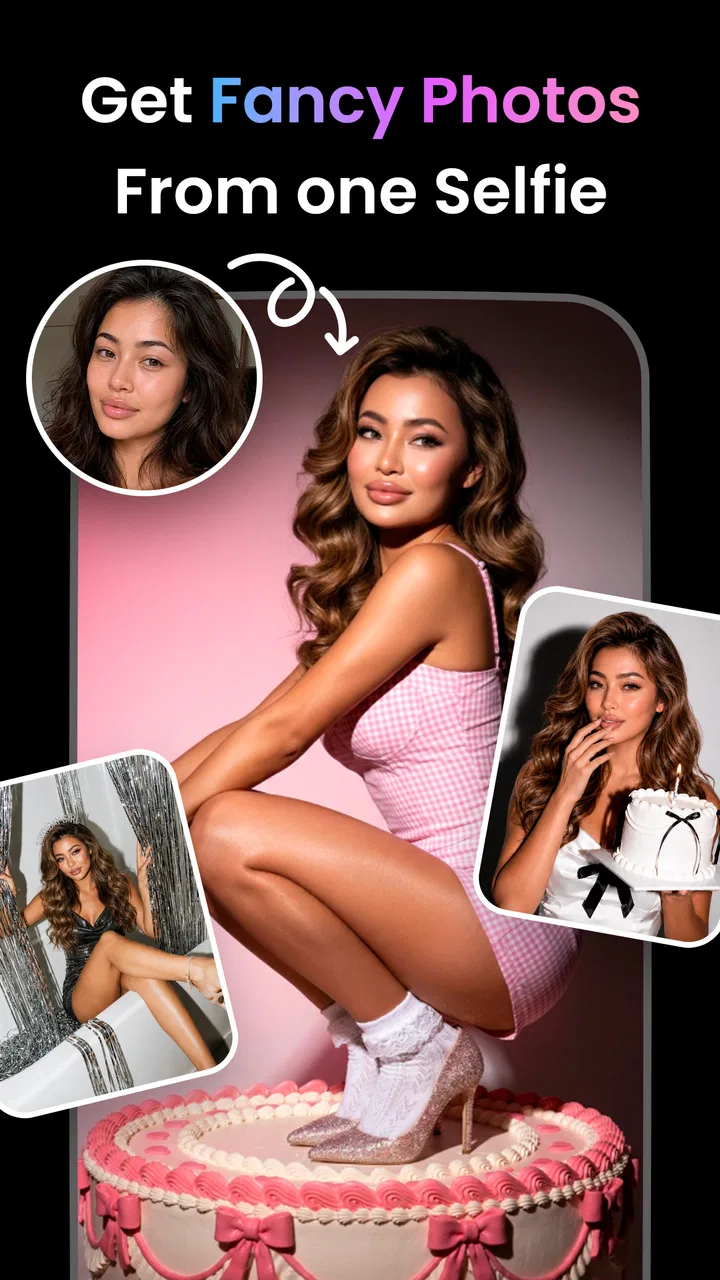
For portraits, I would keep expectations realistic. AI-generated faces can look attractive while still changing small identity details, facial proportions, hair, or expression. If the purpose is a playful avatar, that may be fine. If the image is meant for a professional profile, I would compare several results and check carefully that it still feels like the person. A generated headshot should not be presented as an untouched photograph.
The same caution applies to tattoo concepts. ARTA can help explore composition, symbolism, and general placement ideas, but I would never take a generated design directly to a tattoo artist without checking it carefully. Lines may be too intricate, lettering may be wrong, and details that look clear on a screen may not translate well to skin. The best workflow is to use the image as a conversation starter with a professional artist.
Another practical tip is to change only one major part of a prompt at a time. If you alter the subject, style, background, and color mood together, you will not know what improved the result. Keeping a short note of the wording behind a favorite image also helps when another household member wants a similar look without copying the whole concept.
Where it beats ordinary creative apps
Compared with a conventional drawing app, ARTA removes the blank-canvas problem. In a drawing program, I have to create the composition myself, choose tools, and spend time building even a rough visual. ARTA is faster when I already have a concept but lack the skill or patience to sketch it. It is also more inviting for a group because people can discuss ideas in plain language instead of passing around a stylus.
Compared with a standard photo editor, its strength is transformation rather than correction. A photo editor is the better choice for cropping a family picture, fixing exposure, removing a small distraction, or preserving somebody’s real appearance. ARTA is more suitable when the objective is to reinterpret an image as a creative concept, portrait style, cartoon, or other imaginative direction.
Compared with a stock-image search, ARTA offers more room for unusual combinations. You can ask for a specific subject, atmosphere, and visual treatment instead of searching through existing images. The compromise is predictability: stock images usually provide a known composition and dependable technical quality, while generated results may contain odd anatomy, inconsistent objects, or details that need another attempt.
For serious design work, I would choose software with precise vector tools, editable layers, and dependable typography. ARTA is not where I would finalize packaging, signage, print layouts, or brand assets that require exact reproduction. Its value is earlier in the process, when I need options quickly and want to discover a direction before investing time in a more demanding program.
Small frictions that affect everyday use
The biggest limitation is inconsistency. A prompt can produce one appealing image and then several results with distracting errors. Faces, hands, jewelry, text, and repeated patterns deserve close inspection. The more specific the request, the more important it becomes to review the image rather than assuming the generator understood every word.
There is also a creative trade-off between convenience and control. ARTA can make an ordinary idea look polished quickly, but I do not get the same direct command over every pixel that I would have in a traditional editor. If I need a person moved slightly to the left, a particular object removed, or a precise color matched to an existing design, the app may not be the most efficient final tool.
Another consideration is the cost of experimentation. Because the app is free to start but offers purchases, I would avoid tapping through an upgrade or generation-related screen casually on a shared device. The person using the app should know whether they are only browsing, using an included option, or entering a paid flow. This is particularly important when the device stores an adult’s payment method.
Performance can also vary with the device and the complexity of the task. I would not plan an urgent presentation around generating the final image at the last minute. For a relaxed household project, waiting and trying again is acceptable. For work with a deadline, I would prepare a backup image or use a tool whose output is more predictable.
Privacy, trust, and responsible sharing
When an app works with portraits, trust becomes part of the review. I would avoid uploading sensitive documents, private family moments, or images of someone who has not agreed to participate. Even when the intended result is harmless, a generated image can travel farther than expected once it is saved, shared, or posted to a social network.
Children should also understand that an AI-created image is not automatically true. A convincing face, scene, or “photo-like” result can still be fictional. I would encourage younger users to label imaginative images clearly when sharing them, particularly if another person might mistake the result for a real event or real portrait.
For household coordination, I prefer a simple rule: do not publish another person’s generated likeness without asking them first. That covers jokes, exaggerated cartoons, and supposedly flattering edits. The fact that an image was made by an app does not remove the need for consent or good judgment.
ARTA’s Everyone rating supports casual family access, but my recommendation remains age-aware rather than age-blind. Younger children may need help choosing prompts and understanding sharing. Older users can usually manage the creative side independently, but they should still know how purchases are handled and which images are private household experiments rather than public-ready work.
Who should install it, and who should skip it
I would recommend ARTA to someone who wants quick visual inspiration, playful portraits, cartoon concepts, tattoo references, or a low-barrier introduction to AI image creation. It is also a good fit for households that enjoy making images together and do not mind treating the first result as a draft. The app’s broad appeal comes from letting non-artists participate in visual decisions without learning a full design workflow.
I would be more cautious recommending it to a professional designer who needs exact control, consistent characters, accurate lettering, or production-ready files. I would also suggest skipping it if the main goal is traditional drawing practice. A drawing app teaches hand control and composition through direct work; ARTA mostly helps with ideation and visual exploration.
Someone seeking a dependable photo editor should choose a conventional editing app instead. ARTA can reinterpret a portrait, but it is not the right answer for subtle retouching where preserving the original person and scene matters more than inventing a new look.
The app has built a sizeable audience, with over a million installs and an average rating of 4.2 from around thirty-seven thousand ratings. Those figures suggest that the concept is resonating with many users, while the rating also fits my experience: enjoyable and capable for casual creation, but not flawless enough to replace specialized tools.
Version, access, and my household verdict
ARTA was released on September 15, 2022, and the current version is 3.36.5. It requires at least iOS 11, so compatibility should be comfortable for many supported Apple devices, though I would still check the device before planning a shared installation. The app is developed by AIBY Inc. and remains free to download, with optional purchases available inside.
After using it with a household mindset, I see ARTA as a friendly creative sandbox rather than a complete art studio. It is excellent for getting past the blank page, comparing visual directions, and giving a family member something tangible to react to. Its weaknesses become obvious when accuracy, privacy, repeatability, or professional control matters more than speed.
My practical recommendation is to use ARTA for ideas, drafts, and shared creative play, then move important work into a more controllable tool. Keep account and payment boundaries clear, ask permission before using someone’s photo, review every generated image for mistakes, and treat portraits or tattoo concepts as suggestions rather than unquestionable results. With those expectations, it is an enjoyable addition to a shared device and a useful way to turn everyday imagination into something visible.
FAQs for ARTA: AI Art & Photo Generator
01What is ARTA: AI Art & Photo Generator, and what can I create with it?
ARTA is an AI-powered image creation and editing app that turns written prompts into digital artwork, illustrations, avatars, wallpapers, and other visual concepts. You can describe a subject, choose an artistic style, and let the generator produce several results. Depending on the version and available tools, it may also transform uploaded photos, enhance images, or apply creative effects.
02Is ARTA: AI Art & Photo Generator free to download and use?
ARTA can generally be downloaded for free, but access to its full set of tools may depend on in-app purchases, credits, advertisements, or a subscription plan. Free users may receive limited generations or reduced access to premium styles and features. Before creating extensively, check the current pricing, trial conditions, renewal terms, and whether unused credits expire, since these details can change.
03Does ARTA require an internet connection to generate images?
Most AI image generation takes place on remote servers, so an active internet connection is normally required when submitting prompts, processing photos, and downloading finished results. The app may allow you to view previously saved images offline, but generation and some editing tools may not work without connectivity. A stable Wi-Fi or mobile-data connection also helps prevent failed requests and repeated credit usage.
04Is ARTA safe for uploading personal photos and creating images?
You should review ARTA’s current privacy policy before uploading selfies, family pictures, documents, or other sensitive material. AI services may process images on external servers, and storage or deletion practices can vary. Avoid uploading confidential photos or images of other people without permission. Also remember that generated results can be inaccurate, stereotyped, or unexpectedly altered, particularly when prompts involve recognizable faces.
05Can I use images generated with ARTA for commercial projects?
Commercial usage depends on ARTA’s current terms of service, the subscription or credit plan used, and sometimes the type of content generated. Personal use is usually simpler, while advertising, merchandise, client work, and monetized social media may require specific rights. AI-generated images can also resemble existing copyrighted styles, trademarks, or people, so review the licensing rules and check each result before publishing it commercially.
Pros
- Generates varied artwork from simple text prompts
- Includes useful photo editing and enhancement tools
- Offers multiple artistic styles and visual effects
- Easy interface for experimenting with AI creations
- Supports creative image ideas without advanced design skills
Cons
- Free usage may be limited by credits or generation quotas
- Results can vary significantly between similar prompts
- Some advanced tools may require a paid subscription
- AI images may include distorted details or unnatural faces
- High-resolution exports can take longer to process

ARTA: AI Art & Photo Generator
Gallery